 russ
russ2022
2022-1-6
split() 还有第二个参数
'red,blue,green,yellow'.split(',')(4)[('red', 'blue', 'green', 'yellow')];
'red,blue,green,yellow'.split(',', 2)(2)[('red', 'blue')];2022-2-8
monaco-editor sql 提示
- 新版
monaco-editor注册sql关键词等提示。 - 可以自由选择加载某个语言包的关键词。
import { language as mysqlLanguage } from 'monaco-editor/esm/vs/basic-languages/mysql/mysql';

registerSql() {
        monaco.languages.registerCompletionItemProvider('sql', {
            provideCompletionItems: function(model, position) {
                var textUntilPosition = model.getValueInRange({
                    startLineNumber: position.lineNumber,
                    startColumn: 1,
                    endLineNumber: position.lineNumber,
                    endColumn: position.column
                });
                var match = textUntilPosition.match(/(\S+)$/);
                if (!match) return [];
                match = match[0].toUpperCase();
                var suggestions = [];
                //关键词
                mysqlLanguage.keywords.forEach(item => {
                    if (item.indexOf(match) !== -1) {
                        suggestions.push({
                            label: item,
                            kind: monaco.languages.CompletionItemKind.Keyword,
                            insertText: item
                        });
                    }
                });
                //算法
                mysqlLanguage.operators.forEach(item => {
                    if (item.indexOf(match) !== -1) {
                        suggestions.push({
                            label: item,
                            kind: monaco.languages.CompletionItemKind.Operator,
                            insertText: item
                        });
                    }
                });
                //内置函数
                mysqlLanguage.builtinFunctions.forEach(item => {
                    if (item.indexOf(match) !== -1) {
                        suggestions.push({
                            label: item,
                            kind: monaco.languages.CompletionItemKind.Function,
                            insertText: item
                        });
                    }
                });
                return {
                    suggestions
                };
            }
        });
}2022-2-11
[5, [[4, 3], 2, 1]] 的数组当作 (5 - ((4 - 3) - 2 - 1)) 进行分组的减法运算。
- 方法一:可以采用正则替换加 eval()函数实现,代码如下:
const testData = [
  5,
  [
    2,
    [
      [3, 1],
      [5, 4]
    ]
  ]
];
const replaceFun = (target) => {
  let targetStr = target + '';
  targetStr.replace(/\[/g, '(').replace(/\]/g, ')').replace(/\,/g, '-');
  console.log(eval(targetStr)); //4
};
replaceFun(testData);- 方法二:采用递归加 reduce()方法实现,代码如下:
/*
 * @Author: wangzhihao
 * @Date: 2022-02-11 10:00:56
 * @LastEditors: wangzhihao
 * @LastEditTime: 2022-02-11 10:07:07
 */
const testData = [
  5,
  [
    2,
    [
      [3, 1],
      [5, 4]
    ]
  ]
];
function reduceSub(xs) {
  if (xs.length === 0) return 0;
  var first = xs.shift();
  var initVal = Array.isArray(first) ? reduceSub(first) : first;

  return xs.reduce((left, right) => {
    return left - (Array.isArray(right) ? reduceSub(right) : right);
  }, initVal);
}
console.log(reduceSub(testData)); //42022-2-16
网络小知识
- 网络地址分为公网 IP 地址和局域网 IP 地址。
- 公网和局域网之间无法直接通信。
- 家里的路由器上有一个运营商提供的公网地址和一个局域网地址。
- 家里的设备之间通信可以直接用局域网。
- 访问万维网上的内容就要借助路由器的公网 IP 与万维网通信再与设备通信。(路由器作为中间人)
- 路由器的管理页面一般是 局域网的第一个地址。比如你连上的地址是 127.16.27.119,你可以在浏览器打开 127.16.27.1,就能打开管理页面了。
curl curlip.me
- 获取当前的 IP 地址信息
2022-3-14
ES6 新增的操作对象的方法 Reflect对象
- 判断对象上是否有某个属性
// 老写法
'assign' in Object; // true

// 新写法
Reflect.has(Object, 'assign'); // true- 删除对象上某个属性
Reflect.deleteProperty(this.ruleData, 'row');2022-7-11
node 默认内存限制 2G
- 更改方式(设置
--max-old-space-size参数 )
'node --max-old-space-size=8192 src/index.js';2022-7-20
nth-child
前言
渲染列表时,需要设置前 3 个元素的 margin-bottom 值与其他的不同。
实现
:nth-child(-n + 3) {
  margin-bottom: 10px;
}扩展
- 选择前几个元素
/*【负方向范围】选择第1个到第6个 */
:nth-child(-n + 6) {
}- 从第几个开始选择
/*【正方向范围】选择从第6个开始的 */
:nth-child(n + 6) {
}- 两者结合使用,可以限制选择某一个范围
/*【限制范围】选择第6个到第9个,取两者的交集 */
:nth-child(-n + 9):nth-child(n + 6) {
}2022-8-4
文件下载的几种方式
- 走
Blob切片模式
handleDownLoadTu() {
      this.$toast({
          content: '下载中...',
          type: 'loading'
      });
      const params = {
          apiSymbol: this.formData.apiSymbol,
          apiVersion: this.formData.apiVersion
      };
      _downTempLate(params, {
          responseType: 'blob'
      })
          .then(res => {
              const blob = new Blob([res.data], { type: res.headers['content-type'] });
              const content = res.headers['content-disposition']; // 注意是全小写,自定义的header也是全小写
              if (content) {
                  let name = content.split('filename=')[1]; // 获取filename的值
                  name = decodeURIComponent(name);
                  let downloadElement = document.createElement('a');
                  let href = window.URL.createObjectURL(blob); //创建下载的链接
                  downloadElement.href = href;
                  name = name.replace(/\"/g, '');
                  downloadElement.download = name; //下载后文件名
                  document.body.appendChild(downloadElement);
                  downloadElement.click(); //点击下载
                  document.body.removeChild(downloadElement); //下载完成移除元素
                  window.URL.revokeObjectURL(href); //释放掉blob对象
                  this.$toast.hide();
                  this.message.success('文件下载成功');
              }
          })
          .catch(err => {
              this.message.error(err);
              this.$toast.hide();
          });
},- 走浏览器 a 标签下载
downloadTempLate() {
    if (!this.formData.apiSymbol) {
        this.message.warning('请先选中API后,在进行操作。');
        return;
    }
    let fileNames = this.apiSymbol + '.csv';
    let link = document.createElement('a');
    link.style.display = 'none';
    console.log(this.formData, 'llll'); //jing-log
    link.href = `/api/oneservice/testData/downTempLate`;
    link.setAttribute('download', decodeURI(fileNames));
    document.body.appendChild(link);
    link.click();
},2022-8-11
git merge 后还没提交,发现不想 merge 这次的代码怎么操作
git merge --abort2022-8-16
nginx 配置支持前端 history 路由
location / {
    root   html;
    index  index.html index.htm;
    try_files $uri $uri/ /index.html;
}root代表网站根目录,这里放的是html文件夹。(装nginx默认就有的)index代表的是首页,这里放的是index.html或者index.htmtry_files这个属性的意思是尝试着访问下这个路径。$uri代表的就是访问路径栏对应的文件。要是还找不到,就把$uri/当成一个文件夹去访问该文件夹下的index.html。最后还找不到就去访问单页应用的/index.html。
2022-8-25
iconfont 添加项目所有图表到购物车方法
[...document.getElementsByClassName('block-icon-list')[1].children].forEach((item) => {
  item.lastChild.firstChild.click();
});2022-8-29
字符串方法 startsWith
startsWith() 方法用来判断当前字符串是否以另外一个给定的子字符串开头,并根据判断结果返回 true 或 false。
语法如下:
str.startsWith(searchString[, position])参数示意:
searchString:要搜索的子字符串。position:在str中搜索searchString的开始位置,默认值为 0。(可选参数)
示例:
var str = 'To be, or not to be, that is the question.';

alert(str.startsWith('To be')); // true
alert(str.startsWith('not to be')); // false
alert(str.startsWith('not to be', 10)); // true字符串方法 endsWith
**endsWith()**方法用来判断当前字符串是否是以另外一个给定的子字符串“结尾”的,根据判断结果返回 true 或 false。
语法如下:
str.endsWith(searchString[, length])参数示意:
searchString:要搜索的子字符串。length:作为str的长度。默认值为str.length。
示例
var str = 'To be, or not to be, that is the question.';

alert(str.endsWith('question.')); // true
alert(str.endsWith('to be')); // false
alert(str.endsWith('to be', 19)); // true字符串方法 padEnd
padEnd() 方法会用一个字符串填充当前字符串(如果需要的话则重复填充),返回填充后达到指定长度的字符串。从当前字符串的末尾(右侧)开始填充。
语法如下:
str.padEnd(targetLength [, padString])参数示意:
targetLength:当前字符串需要填充到的目标长度。如果这个数值小于当前字符串的长度,则返回当前字符串本身。padString:填充字符串。如果字符串太长,使填充后的字符串长度超过了目标长度,则只保留最左侧的部分,其他部分会被截断。此参数的缺省值为 " "(U+0020)。
示例
'abc'.padEnd(10); // "abc       "
'abc'.padEnd(10, 'foo'); // "abcfoofoof"
'abc'.padEnd(6, '123456'); // "abc123"
'abc'.padEnd(1); // "abc"字符串方法 padStart
padStart() 方法用另一个字符串填充当前字符串 (如果需要的话,会重复多次),以便产生的字符串达到给定的长度。从当前字符串的左侧开始填充。
语法如下:
str.padEnd(targetLength [, padString])参数示意:
targetLength:当前字符串需要填充到的目标长度。如果这个数值小于当前字符串的长度,则返回当前字符串本身。padString:填充字符串。如果字符串太长,使填充后的字符串长度超过了目标长度,则只保留最左侧的部分,其他部分会被截断。此参数的默认值为 " "(U+0020)。
示例
'abc'.padStart(10); // "       abc"
'abc'.padStart(10, 'foo'); // "foofoofabc"
'abc'.padStart(6, '123465'); // "123abc"
'abc'.padStart(8, '0'); // "00000abc"
'abc'.padStart(1); // "abc"2022-8-30
匹配两个特殊字符中间内容的正则表达式
const targetStr = str.match(/(?<=\.).*?(?=\:)/g); // 匹配 . 和 : 中间的所有内容- 上面表达式中
.*?,.代表任意字符,*代表一个或多个,?代表贪婪模式。
2022-8-31
Git 修改某次 commit 的用户和邮箱地址及评注信息
**基于以下提交 log **
commit 1a0c9d8cfe0ca7151519aae4dd6d57188064a5c1 (HEAD -> main, origin/main, origin/HEAD)
Author: wangzhihao <1269928993@qq.com>
Date:   Tue Aug 30 21:43:49 2022 +0800

    chore: class compiler

commit db01629dcefee1cdd4e6f73668dc31c6d02d6364
Author: jingjing20 <1269928993@qq.com>
Date:   Mon Aug 29 13:18:01 2022 +0800

    update: class observer  init

commit e0cf83404fc909a8f340fe9375498788423f44fb
Author: jingjing20 <1269928993@qq.com>
Date:   Sun Aug 28 00:24:12 2022 +0800

updata: 初始化 mini-vue操作步骤
- 1、找到要修改的
commit,本例中的1a0c9d8cfe0ca7151519aae4dd6d57188064a5c1。 - 2、执行 git rebase -i <要修改的 commitId 的前一个 commitid>,这里的
db01629dcefee1cdd4e6f73668dc31c6d02d6364。这里即执行如下命令:
git rebase -i <db01629dcefee1cdd4e6f73668dc31c6d02d6364>- 3、在
rebase的交互模式下,将要修改的commit状态由pick修改为edit。 - 4、修改后,保存退出
rebase交互模式,我们会停在该commit下(下图中的Stopped at 27f749c... chore: class compiler),并执行修复操作。
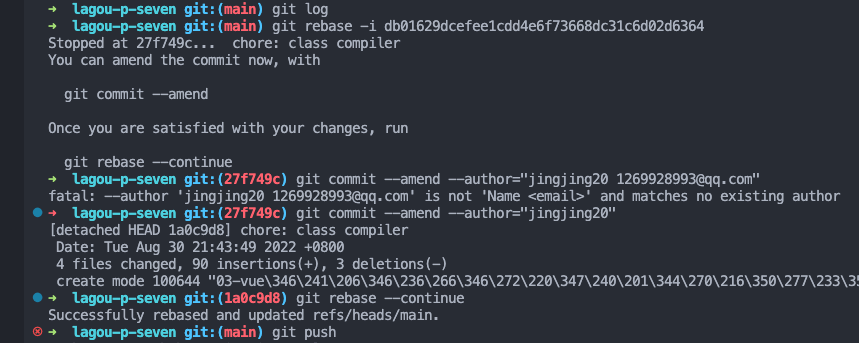
我们可以进行不同的修改
js改作者和邮件地址:git commit --amend --author=“Author Name email@address.com” 改日期时间:git commit --amend --date=“Thu, 07 Apr 2005 22:13:13 +0200” 改commit评注:git commit --amend -m “New Commit Message”修改完后执行
git rebase --continue最后将修改强制推送到远程仓库
git push origin master --force
2022-9-14
innerHTML 和 outerHTML 的区别
<!DOCTYPE html>
<html lang="en">
  <head>
    <meta charset="UTF-8" />
    <meta name="viewport" content="width=device-width, initial-scale=1.0" />
    <title>outerHtml</title>
  </head>
  <body>
    <div id="app">
      <p>迦南学院</p>
      <p>逼王</p>
    </div>
    <script>
      const app = document.querySelector('#app');
      console.log(app.innerHTML);
      // 会打印出
      // <p>迦南学院</p>
      // <p>逼王</p>

      console.log(app.outerHTML);
      // 会打印出
      // <div id="app">
      //   <p>迦南学院</p>
      //   <p>逼王</p>
      // </div>
    </script>
  </body>
</html>2022-11-2
location.host 和 location.hostname 的区别
- location.host
Location接口的host属性是包含了主机的一段USVString,其中包含:主机名,如果 URL 的端口号是非空的,还会跟上一个':',最后是 URL 的端口号。
var anchor = document.createElement('a');

anchor.href = 'https://developer.mozilla.org/en-US/Location.host';
anchor.host == 'developer.mozilla.org';

anchor.href = 'https://developer.mozilla.org:443/en-US/Location.host';
anchor.host == 'developer.mozilla.org';
// 这里 host 中没有包含端口号,因为 443 是 https 协议的默认端口号

anchor.href = 'https://developer.mozilla.org:4097/en-US/Location.host';
anchor.host == 'developer.mozilla.org:4097';2022-12-12
g2 和 g2/plot 里面怎么实现坐标轴 label 超出悬浮展示全文
- 利用图表提供的交互事件实现
resourceRank.on('axis-label:mouseenter', (ev) => {
  // 判断是否创建过div框,如果创建过就不再创建了
  let id = document.getElementById('extension');
  if (!id) {
    id = document.createElement('div');
    id.id = 'extension';
    document.body.appendChild(id);
    id.style.display = 'none';
  }

  id.style.position = 'absolute';
  id.style.color = '#333';
  id.style.background = '#fff';
  id.style.boxShadow = '#aeaeae 0 0 10px';
  id.style.fontSize = '12px';
  id.style.padding = '5px';
  id.style.display = 'inline';
  id.style.borderRadius = '3px';
  id.style.zIndex = '100';
  id.innerHTML = ev.target.cfg.delegateObject.item.name;
  this.idNode = document.getElementById(this.container);
  this.idNode.addEventListener('mousemove', (event) => {
    const xx = event.pageX + 20;
    const yy = event.pageY + 20;
    id.style.top = yy + 'px';
    id.style.left = xx + 'px';
  });
});
// 捕捉axis-mouseleave隐藏DOM
resourceRank.on('axis-label:mouseleave', () => {
  const id = document.getElementById('extension');
  id.style.display = 'none';
});